Anúncios
Imagine settling into your favorite chair and seeing your devices work together in harmony. Building a smart entertainment center turns a living room into a digitally connected relaxation zone. It feels like switching from basic cable to a streaming universe—one well-tuned click brings instant comfort.
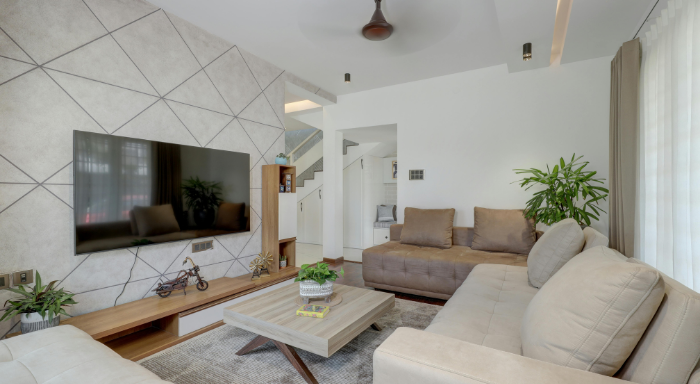
Upgrading to a smart entertainment setup matters because it brings convenience, energy savings, and endless content. As streaming, gaming, and hands-free control become normal, a well-planned system can make life easier while impressing family and friends alike. Surprises are everywhere, and it’s all in your hands.
Want to simplify movie nights, energize music sessions, and control everything with your voice or phone? Dive in for practical tips, device pairings, configuration guidance, and details that help every step of your smart entertainment journey.
Planning a Seamless Smart Entertainment Layout
Outlining your ideal zone lets you avoid costly rewiring or extra gear. Start by mapping device placement and cable runs before adding smart entertainment tools. This approach ensures smooth flow and reduces frustrating setbacks later on.
Choose a central location for your TV and speakers so audio and visuals reach every seat. Make sure power outlets and network connections support your ambitions—a little planning goes a long way for a clutter-free space.
Anúncios
Positioning for Immersive Audio
Surround sound makes every movie immersive, but only when speakers face the right direction. Angle them toward the seating zone and away from walls to reduce echo. This setup makes explosions boom and dialogue clear.
Use stands or wall mounts for rear speakers to elevate sound effects. If space gets tight, stream-friendly soundbars offer more than adequate quality while blending into your room’s style.
When comparing in-wall vs. free-standing speakers, consider room size and décor preferences. In-wall designs disappear visually, while portable speakers let you tweak layouts with little effort.
Anúncios
Optimizing Viewing Distance and Angles
Set your television so the screen’s center aligns with eye level when seated. This prevents neck strain during long gaming or binge-watching sessions. Measure a straight line from seats to plan ideal distances—about 1.5 times the screen’s width.
Use a robust TV mount to tilt or swivel for wide-angle group viewing. An adjustable arm lets multiple users experience the sharpest visuals, perfect for parties or shared sports nights.
If ambient light causes glare, invest in blackout curtains or try shifting the screen away from windows. Minor tweaks can eliminate distracting reflections or color washout, making smart entertainment feel high-end.
| Device | Main Benefit | Best Location | Pro Tip |
|---|---|---|---|
| Smart TV | Central control & streaming | Eye-level, main wall | Pair with universal remote for simplicity |
| Soundbar | Enhanced, clear sound | Below or above TV | Use wall mount for tidy appearance |
| Streaming Stick | Content variety | Direct HDMI on TV | Connect to 5GHz Wi-Fi for speed |
| Universal Remote | One-touch control | Coffee table | Set favorite scenes for quick access |
| Smart Speaker | Voice commands, music | Corner shelf | Link to lighting for special effects |
Selecting Components That Work Together Effortlessly
Picking compatible devices from the start saves trouble down the road. Using a unified ecosystem for your smart entertainment gear helps everything communicate clearly. This brings smooth streaming, crisp sound, and stress-free control.
Look for devices that support major platforms such as Google Assistant, Apple HomeKit, or Amazon Alexa. The right hub becomes the traffic controller, keeping every gadget in sync and responsive to your commands or routine schedules.
Creating an Ecosystem Without Frustration
Choose a central smart hub first, then build outwards with bulbs, remotes, and sensors that work with it. This ensures consistent updates and fewer forgotten passwords so lights, sound, and TV all respond instantly.
- Research device compatibility before buying to avoid connection delays or dropped features; check for logos like “Works with Alexa.”
- Set up a single user account for the home to avoid sign-in confusion; it also streamlines voice controls for every device.
- Group devices by room or function in the app, such as all living room lighting and sound under one label. This keeps routines smooth.
- Create automation rules so, for example, the TV, lights, and stereo all respond to a “Movie Night” command.
- Test every routine with the family present so everyone learns triggers and can adjust reactions or volume for comfort.
Integrating smart entertainment may feel like choreographing a dance. Once everything is in cadence, all it takes is a single command to begin the show.
Streamlining Content Access for Everyone
Add streaming apps to all displays, preloading favorites for every family member. Personal profiles minimize scrolling if kids want cartoons and grown-ups crave documentaries. Sync remote controls for a frictionless experience switching between shows or consoles.
- Set up parental controls and PINs to keep content age-appropriate, providing confidence when children use the system alone.
- Schedule regular app updates at night to avoid interruptions during peak viewing times. This keeps smart entertainment running smoothly in the background.
- Label HDMI ports on both the TV and AV receiver so anyone can find the right source quickly, reducing confusion or accidental input switches.
- Link streaming subscriptions in a central app to simplify billing and avoid juggling passwords across different services.
- Document step-by-step guides for guests synched to a QR code—scan and watch explanations appear instantly for setup or troubleshooting.
Universal access makes every user feel invited. Whenever someone shouts, “play my playlist!” the room adapts instantly with smart entertainment features.
Integrating Audio and Visuals for a Unified Experience
Tie audio and video together to raise your living room’s fun factor. Smart entertainment relies on devices working in concert, creating moods for movies or music that feel polished and coordinated.
Dedicated apps unify your TV, speakers, and lights. This means a horror movie dims the bulbs while bass increases—a single command cues up the atmosphere, saving several manual steps. Even casual music sessions benefit from smooth sync.
Pairing Multichannel Audio with Visual Scenes
Tuning your sound so effects bounce off surfaces transforms any living room. During an action film, pair subwoofers under furniture with wall-mounted speakers for immersive blasts that vibrate through the couch.
For musicals, sync colored bulbs with the tempo—tap along to the beat as smart entertainment controls dip and pulse the lighting. This visual dynamic turns easy-going evenings into personalized events, delighting friends and family.
Set up music zones around your space, letting party guests drift from relaxing in one area to dancing in another. Wireless speakers linked by room make seamless transitions, no matter how the crowd moves.
Using Displays Beyond Movies and Shows
Modern smart TVs serve as photo frames, news tickers, and video call centers. Display personal albums during gatherings for a homey feel—group travel photos with themed playlists in one tap for spontaneous nostalgia.
Enable split-screen or picture-in-picture features to monitor security cams, sports updates, or social feeds during the main viewing event. Smart entertainment turns TVs from static screens into dynamic command centers effortlessly.
When the show ends, set your system to display calming art or clock faces. This reduces blue-light fatigue, keeping eye comfort and style front and center year-round.
Automating Routines with Smart Remote and Voice Control
Automation brings consistency to everyday living and lets you customize routines for the entire household. Pairing remotes and voice assistants cuts out unnecessary steps, freeing up your hands for snacks or games.
Configure “Good Morning” commands to play news and adjust volume, or “Night Mode” routines that dim the lights and power down displays. Smart entertainment streamlines these transitions while you relax or multitask.
Setting Up Scenes for Every Mood
Create prebuilt scenes like “Movie Night” or “Chill Lounge” so one button or voice command changes lighting, audio, and display input all at once. This keeps energy focused on friends instead of hunting for controls.
For family time, set routines that prioritize softer backgrounds and reduce blue light, helping everyone unwind in comfort. Use “Game On” scene scripts to crank sound and highlight action, bringing excitement into the room.
If you use analogies, think of scenes as recipes—a pinch of audio change here, a dash of lighting there. Once seasoned to taste, they’re always ready for reliable results.
Linking Voice Assistants and Universal Remotes
Connect a universal remote with popular voice assistants. This allows hands-free operation—just say, “Turn on sports,” and enjoy instant setup. Family members of any tech skill can manage smart entertainment without a learning curve.
Add custom voice commands for niche routines like lowering blinds or turning up baseball commentary. Ensure every voice is enrolled so anyone can activate shortcuts in a natural way, no wrestling with apps or remotes.
Train the system to recognize intonation or phrasing, making corrections easy if someone’s command doesn’t work the first time. The result: the system feels as intuitive as flipping a light switch.
Making Data and Privacy Choices That Fit Your Home
Selecting privacy settings is as influential as picking devices. Smart entertainment brings connectivity but invites choices about data, listening, and device permissions. Setting these up today prevents future surprises or unwanted eavesdropping.
Review each device’s permissions and reset to factory defaults when bringing home new gadgets. This wipes old connections, ensuring your network and privacy begin with a clean slate every time.
Controlling Voice Recordings and Access Logs
Disable long-term storage of voice commands in your device’s privacy menu, if that fits your comfort level. Check access logs for patterns—if something activates at odd times, investigate app connections or re-register user accounts.
Use two-factor authentication for both device apps and user profiles to block bad actors. This keeps your smart entertainment secure and your digital routines personal, not public.
Educate everyone in your household to spot unfamiliar notifications or permissions requests. Turn learning into a game: ask who can find the new “approve sign-in” pop-up first after setting a fresh password.
Balancing Convenience With Confidentiality
Allowing voice search can feel liberating—songs find you, not the other way around. But always weigh the benefits against giving up some privacy; only you can decide where that balance lies in your setup.
Choose localized device control where possible—opting for local network commands instead of always-on cloud connections. This reduces data leave your home, but keeps smart entertainment humming along.
Delete unused profiles or test user accounts regularly, preventing confusion if guests or kids switch routines. Simple digital housekeeping maintains both convenience and confidentiality, giving peace of mind alongside power.
Staying Ahead With System Maintenance and Upgrades
Regular upkeep of your smart entertainment setup prevents glitches and keeps everything running at peak performance. Think of it like an oil change: a little attention now avoids bigger hassles down the road.
Check devices for firmware updates, refresh security passwords, and review automation routines every few months. This makes sure integrations stay current, giving you the latest features and bug fixes without stress.
Scheduling Upgrades Without Disrupting Family Use
Plan big changes for weekdays to avoid disrupting family movie nights or get-togethers. Communicate upgrade windows, and test compatibility by updating one device at a time instead of everything at once.
Set up backup routines or “manual override” scenarios for critical nights, keeping the option for basic controls if fresh firmware introduces conflicts. Smart entertainment stays reliable because you’re proactive, not reactive.
After upgrades, demonstrate new features for everyone—let each family member present one trick to boost ownership and engagement with your new smart entertainment tools.
Evaluating New Tech for Value, Not Hype
When a new gadget tempts you, ask whether it solves a recurring frustration or meaningfully upgrades comfort. Check for documented improvements such as lower latency or energy savings before investing in upgrades.
Avoid redundant tech—if a soundbar already offers voice control, adding another smart speaker might clutter the experience. Map out what current devices do well before expanding the ecosystem.
Assess each addition with a hands-on trial. Schedule a one-week testing period before integrating it permanently; gather feedback from everyone. Smart entertainment grows in line with real needs, not fleeting trends.
Final Thoughts on Crafting Your Ultimate Smart Entertainment Experience
Smart entertainment systems offer genuine comfort and convenience when components work together seamlessly. Every choice—from speaker angles to voice routines—adds practical value and keeps the living room fresh. The system adapts as your routine or family grows.
Thoughtful setup transforms any lounge into a personal entertainment center. With clear device roles and privacy options in place, every gathering becomes more immersive. Regular tweaks and upgrades keep features current and fun for everyone.
The fun lies in finding your home’s character through tech and sound. As you customize each element, smart entertainment responds, creating comfort, control, and excitement that’s always ready for your next favorite moment.
Ready to upgrade your home and make it smarter?